


Department of Information Technology
As the Information Technology Department of Cyprus Aydın University, we manage the IT infrastructure that ensures all academic and administrative processes at our university are carried out seamlessly, securely, and efficiently. We continuously develop a broad technological structure ranging from campus networks to server systems, from corporate applications to user support services, guiding our university’s digital transformation. Our goal is to support and facilitate education, research, and work processes by providing our students, academic staff, and all our colleagues with a modern, reliable, and accessible technology environment.
Message from the Director
Message from the Director
The uninterrupted progress of academic, research, and administrative activities at Cyprus Aydın University relies on a robust, reliable, and scalable Information Technology/IT infrastructure. As the Information Technology Department, we manage a broad technological ecosystem ranging from campus networks to laboratory infrastructure, from enterprise software to online services, strongly supporting the digital life of our university.
Today, the IT infrastructure is not just a technical requirement; it also means fast access, security, efficiency, and continuity. While you focus on your classes, carry out your projects, complete your administrative tasks, or connect to systems from outside the campus, there is an invisible mechanism working tirelessly in the background. Our primary goal is to contribute to our university’s development vision by making this mechanism user-friendly, secure, and accessible to everyone.
When we use technology correctly, effectively, and consciously, learning, production, and collaboration become stronger. Every opinion and suggestion you give us on this journey is very important to us. As the Information Technology Department, we want you to know that we are always by your side.
Dear Students, we are working to simplify and facilitate processes for you. As you pursue your dreams, we will continue to be your support in the background.
Our Team

Prof. Dr. Rukiye Kilili
Director
[email protected]

Abedalelah AL-SHURBAJI
Information Systems Management Officer
[email protected]

Mehmet YÜRER
Information Systems Support Specialist
[email protected]

Hüseyin Özgür ÇAKMAK
Information Systems Support Staff
[email protected]
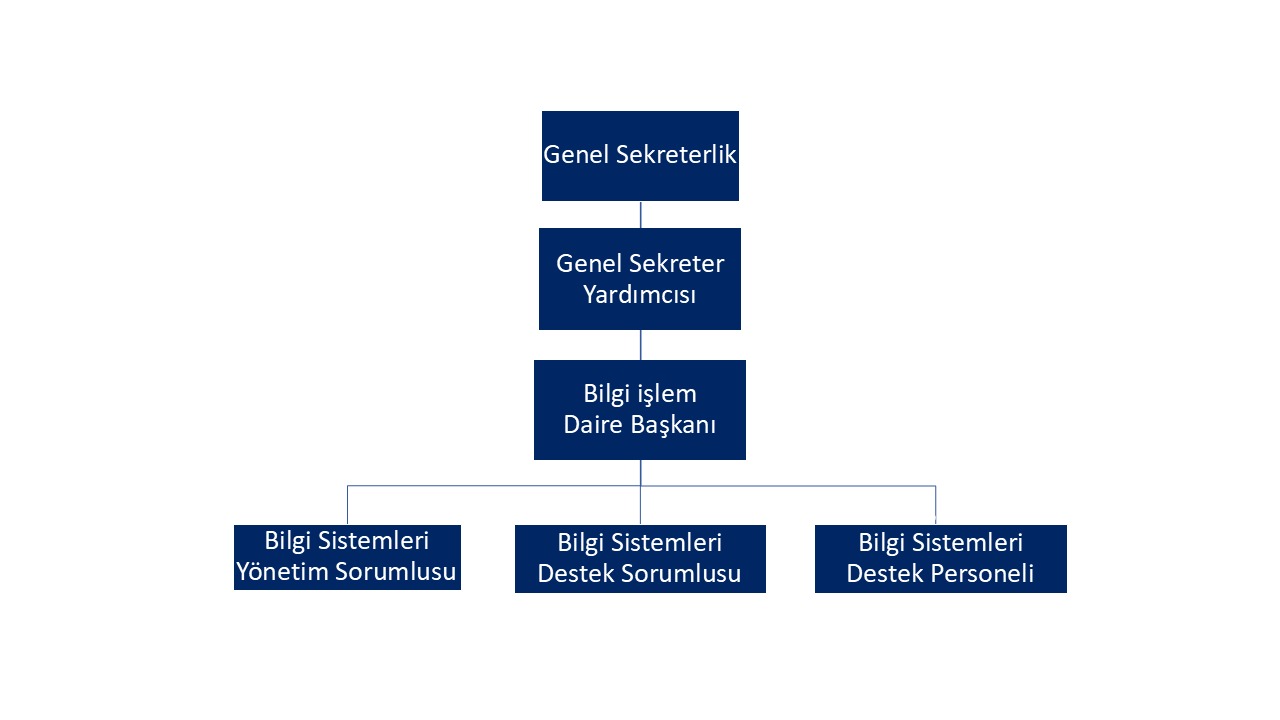
Organizational Chart
Employees Accounts
CAU360 Accounts
When you start your position as a staff member, depending on your department, you will be assigned a CAU360 account by the Personnel Directorate or the Human Resources Department, and your staff ID card will be issued to you.
You can access your CAU360 account at cau360.cau.edu.tr or via mobile if you prefer.
Through your CAU360 account, you can enter your office information, control your entry and exit through the turnstiles, and submit a B.I.D.B. support request.
Email Account
After receiving your employee ID card, you must request a “BİDB User Identification” form from the office on the Ground Floor of Block A to create your BİDB account. The information you will request on this form is your email, login for fixed computers, Wi-Fi, and Office365 account. When you change your account password, your password will be synchronized across all services.
Password change process
- All your accounts (email, desktop computers, Office 365) share the password for your CAU360 account.
- You can change your password via your CAU360 account by selecting “account settings > change password > save”.
- After changing your password, we recommend that you log out of all your accounts and log back in with your new password.
If you have forgotten your password, you must contact the Information Technology Department.
Support Requests
For issues related to the use of fixed assets such as computers, your access to web servers, your connection to the corporate network, printer problems, software installations, internet issues, internal telephone problems, podiums/projectors/computers in classrooms/laboratories, etc. You can contact the IT department via email at [email protected] for issues related to the above topics.
When your support request is received, you will receive an email notification that your request has been processed. This notification email will include the status of your request and the name of the IT support staff member. IT support staff will contact you based on their workload and the order of requests.
- No unlicensed software may be installed on fixed asset computers. The responsibility for software licenses on fixed asset computers used by our university staff (except for licensed programs legally purchased by our university) lies with the relevant staff member.
- If the operating system needs to be reinstalled on a malfunctioning fixed asset computer and the problem is not a disk failure, unless otherwise specified, IT support personnel are only responsible for retrieving the desktop, documents, and downloads folders of the personnel using the computer. Furthermore, IT is not responsible for backing up or copying special software within the system or for any other data loss.
Staff Internet Access
- As the Information Technology Department, providing high-speed, uninterrupted, and secure internet is our most important service. Within these criteria, our fixed computers connect to the internet via a wired network. Non-fixed computers cannot connect to the internet via a wired network.
- Due to the recent increase in cyber security threats, only fixed computers can connect to certain web service servers, shared folders, and printers.
Non-fixed computers can access the internet via the wireless network (Wi-Fi) located throughout the campus in libraries, faculties, and common social areas by entering their email information.
Staff Email Service
As the Information Processing Department, one of our core services is providing email service to our staff members.
After receiving your staff ID card, you must request B block BIDB User Identification to create your email account.
- Staff email accounts, unlike student email accounts, are hosted on the Microsoft Exchange server. Within an organization, productivity, business continuity, and uninterrupted communication are much easier with the Exchange Server. The Exchange mail service also provides us with a calendar service, making it easier to plan our work and keep track of our meetings.
- You can access your email account from outlook.com and from any application that supports the Exchange service in a synchronized manner.
- A 2 GB email storage environment is provided.
- Incoming and outgoing emails are moved to the archive server after 6 months. Since the transferred emails are removed from the 2 GB storage environment, continuity in storage space is ensured.
- All emails received by and sent by our staff are scanned for viruses and spam.
- Email accounts are closed once our department receives notification that an employee’s employment contract has ended.
Personnel Office365 Service
In collaboration with Cyprus Aydın University and Microsoft, all our staff and students (including alumni) can access and use Office 365 applications from their computers, phones, or web browsers.
You can access Office 365 applications at portal.office.com.
- When you reach the Microsoft sign-in screen, you must enter the email address provided to you by Cyprus Aydın University here.
- When you click the Next button, you will be redirected to a different page for account verification.
- You must enter the email password provided by BIDB in the password field.
When you enter your password correctly, you will be logged into the portal.office365 page.
On this page, you can use Office 365 applications online, and download and install the most basic Word, Excel, PowerPoint, Outlook, OneDrive, and Teams applications to your computer using the setup file created for you.
- You can install these applications on up to 5 Windows or Mac computers for free.
- You will have 1 TB of OneDrive storage space provided by Microsoft.
- You can configure your email address in the Outlook application downloaded and installed on your computer, but you cannot access your email address from the Office 365 platform. Employee email account configurations are handled differently. For more information, visit the Email Service page under Services Offered to Employees in the menu on the left.
Basic Office 365 Applications
Delve
Gain personal insights and important information based on who you work with and what you work on.
Excel
Discover and connect to data, perform modeling and analysis on that data, and visualize insights.
Forms
Create surveys, tests, and polls. Easily view results in real time.
Kaizala
A simple and secure mobile chat app for work.
People
Organize contact information for all your friends, family, colleagues, and acquaintances.
Lists
Allow users to create data within lists, share it, and track it.
OneDrive
Store, access, and share your files from one place.
OneNote
Capture and organize your notes across all your devices.
Outlook (For Students Only)
First-class email with the rich and familiar Outlook experience.
Planner
Create plans, organize and assign tasks, share files, and get progress updates.
Power Apps
Build mobile and web apps using data your organization already uses.
Power Automate
Create workflows across your apps, files, and data to automate time-consuming tasks.
Power BI
Create dynamic, engaging, actionable dashboards you can share with others.
PowerPoint
Design professional presentations.
Project
Develop project plans, assign tasks, track progress, and manage budgets.
SharePoint
Share and manage content, information, and applications to enhance teamwork.
Stream
Share videos of classes, meetings, presentations, and training sessions.
Sway
Create and share interactive reports, presentations, and personal stories.
Calendar
Create and share meeting and event schedules, and get automatic reminders.
Teams
A customizable, chat-based team workspace in the Office 365 app.
To Do
Track all your tasks in one place with machine intelligence that helps you organize, prioritize, and accomplish more together.
Whiteboard
Design and collaborate on a free-form canvas designed for pen, touch, and keyboard.
Word
Show off your writing skills.
Yammer
Connect with colleagues and classmates, share information, and come together for projects.
Student Account and Card

Your CAU360 username and password are also your email address in the format @stu.cau.edu.tr.
When you change your CAU360 password, the passwords for these services will also change.
If you forget your password, you can reset it from the “Forgot My Password” page or request a new password from the Office of Student Affairs.
Your entry and exit permissions will be automatically assigned to your card by the system.
If you lose your card, you must contact the Office of Student Affairs (B Block, Ground Floor).

Wireless Internet Access
Wireless internet access (Wi-Fi) is available throughout the campus in the Library, Faculties, and common social areas.
To connect from your phone;
Find the Wi-Fi channel in your Wi-Fi settings.
Cyprus Aydın University
Use the password: cau.stu.2025
Then click connect.
To connect from a computer:
Find the Wi-Fi channel in your Wi-Fi settings.
Cyprus Aydın University
Use the password: cau.stu.2025
Then click connect.
If you are experiencing problems with your Wi-Fi connection, you can get support from the IT office on the ground floor of Block A.
Student Email Access
Cyprus Aydın University and Microsoft collaborate to provide Outlook, an Office365 service, offering email services to our students. Every student with a CAU360 account (including our alumni) can benefit from this email service.
After logging into CAU360, you can access your email account by selecting the Email option in the left panel, accessing portal.office.com, or directly accessing outlook.office.com.

Your email password: Your CAU360 password
Student Office 365 Service
Through the collaboration between Cyprus Aydın University and Microsoft, you can access Office 365 applications via computer, phone, or web browser. Graduates can use Office 365 applications via web browser with the @stu.cau.edu.tr account assigned by the university. Desktop application installation is available for staff and active students.
You can access Office 365 applications at portal.office.com.
- When you reach the Microsoft sign-in screen, you must enter the email address provided to you by Cyprus Aydın University here.
- When you click the Next button, you will be redirected to a different page for account verification.
- You must enter the email password provided by BIDB in the password field.
When you enter your password correctly, you will be logged into the portal.office365 page.
On this page, you can use Office 365 applications online, and download and install the most basic Word, Excel, PowerPoint, Outlook, OneDrive, and Teams applications to your computer using the setup file created for you.
- You can install these applications on up to 5 Windows or Mac computers for free.
- You will have 1 TB of OneDrive storage space provided by Microsoft.
- You can configure your email address in the Outlook application downloaded and installed on your computer, but you cannot access your email address from the office365 platform. Employee email account configurations are handled differently. For more information, visit the Email Service page under Services Offered to Employees in the menu on the left.
Basic Office 365 Applications
Delve
Gain personal insights and important information based on who you work with and what you work on.
Excel
Discover and connect to data, perform modeling and analysis on that data, and visualize insights.
Forms
Create surveys, tests, and polls. Easily view results in real time.
Kaizala
A simple and secure mobile chat app for work.
People
Organize contact information for all your friends, family, colleagues, and acquaintances.
Lists
Allow users to create data within lists, share it, and track it.
OneDrive
Store, access, and share your files from one place.
OneNote
Capture and organize your notes across all your devices.
Outlook (For Students Only)
Premium email with a rich and familiar Outlook experience.
Planner
Create plans, organize and assign tasks, share files, and get progress updates.
Power Apps
Build mobile and web apps using the data your organization already uses.
Power Automate
Create workflows between your apps, files, and data to automate time-consuming tasks.
Power BI
Create dynamic and engaging data dashboards that you can share and interact with.
PowerPoint
Design professional presentations.
Project
Develop project plans, assign tasks, track progress, and manage budgets.
SharePoint
Share and manage content, information, and applications to enhance teamwork.
Stream
Share videos of classes, meetings, presentations, and training sessions.
Sway
Create and share interactive reports, presentations, and personal stories.
Calendar
Create and share meeting and event schedules, and get automatic reminders.
Teams
A customizable, chat-based team workspace within the Office 365 app.
To Do
Track all your tasks in one place with machine intelligence that helps you organize, prioritize, and accomplish more together.
Whiteboard
Design and collaborate on a freeform canvas designed for pen, touch, and keyboard.
Word
Show off your writing skills.
Yammer
Connect with your work and classmates, share information, and collaborate on projects.
Frequently Asked Questions (FAQ)
Sadece ilk kayıt işlemleri sırasında Bilgi İşlem Daire Başkanlığı kartınızı size teslim eder. Bundan sonraki kartınızla ilgili bütün işlemler için Öğrenci İşleri Daire Başkanlığı’na gitmeniz gerekmektedir.
“Şifremi Unuttum” adresinden şifrenizi sıfırlayabilirsiniz. Eğer şifrenizi sıfırlamakla ilgili sorun yaşıyorsanız T blok Öğrenci İşleri Daire Başkanlığına müracat ederek yeni şifre temininde bulunabilirsiniz.
Adobe sistemindeki derslerinizi izlemek için lütfen UBIS üzerindeki ‘Online Derslerim’ menüsünü kullanarak derse giriniz.
CAU360 üzerinde ‘Yazıldığım Dersler’ sekmesini kullanarak derse yazılma durumunuzu kontrol ediniz. Derslerin yanında ‘*’ işareti görüyorsanız lütfen sözleşme oluşturunuz.
Dersiniz ders programında görünmüyor veya dersin Öğretim Elemanı bilgisi ‘Yazıldığım Dersler’ altında belirtilmiyorsa lütfen bölüm başkanlığınız ile irtibata geçiniz.
Devamsızlık bilgileriniz dersin Öğretim Elemanı tarafından girilmektedir. Konuyla ilgili olarak dersin Öğretim Elemanı ile irtibata geçiniz. Ayrıca derslere UBIS üzerinden katıldığınızdan emin olunuz.
Devamsızlık bilgileriniz dersin Öğretim Elemanı tarafından girilmektedir. Konuyla ilgili olarak dersin Öğretim Elemanı ile irtibata geçiniz. Ayrıca derslere UBIS üzerinden katıldığınızdan emin olunuz.
Öğrenci E-Mail hesabınıza erişimle ilgili sayfaya buraya tıklayarak ulaşabilirsiniz.
Eğer sorununuz devam ediyorsa D blok giriş kat BİDB Teknik Ofis-2203 veya T blok -1 BİDB Teknik Ofisten destek alabilirsiniz.
Buraya tıklayarak kablosuz ağa bağlanma yönergelerini takip ederek kablosuz ağa bağlanabilirsiniz.
Eğer kablosuz ağa bağlanmayla ilgili sorununuz devam ediyorsa D blok giriş kat BİDB Teknik Ofis-2203 veya T blok -1 BİDB Teknik Ofisten destek alabilirsiniz.
İstanbul Aydın Üniversitesi ve Microsoft iş birliği ile bütün öğrencilerimizin bir adet Office365 hesabı olur. Portal.office.com bağlantı adresini kullanarak bu programlara erişebilir, bilgisayarınıza kurabilirsiniz. Detaylı bilgi için Öğrencilere Sunulan Hizmetlerden Office 365 bağlantısını kullanınız.
Eğer kullanacağınız bilgisayar Windows işletim sistemli bir bilgisayar ise ilk olarak bilgisayarın internet kablosunun takılı olup olmadığına bakınız. Bilgisayarda internet olduğundan emin olduktan sonra UBIS kullanıcı adınız ve şifreniz ile oturum açabilirsiniz. Eğer kullanacağınız bilgisayar Mac bilgisayar ise şifresiz bir şekilde bilgisayarı kullanabilirsiniz.
Yaşadığınız sorunlar ile ilgili D blok giriş kat 2203 – teknik ofisten yardım alabilirsiniz.
Bilgi İşlem Daire Başkanlığı olarak sadece üniversitenin bilgisayarlarından sorumluyuz. Şahsi bilgisayarlar için sadece BİDB olarak vermiş olduğumuz hizmetlerin(UBIS, Office365, Mail) desteğini sağlayabiliriz.
Bilgi Merkezimizin sitesindeki yönergeleri takip ederek veritabanına erişebilirsiniz. kutuphane.aydin.edu.tr adresine girdiğinizde solda yer alan menüden erişebilirsiniz.
Usage Policies
Except for insignificant and occasional non-commercial personal use, provided that such use is clearly insignificant, does not create a direct expense for the University, and does not interfere with or compete with legitimate University business.
Dear Cyprus Aydın University Faculty and Administrative Staff; Passwords are the technological virtual keys that protect the values of our private lives…
Only software products that have the legal right to be installed may be used on computers owned by the university, at service providers, or on their networks.
The University provides users with access to World Wide Web (WWW) resources and facilities by connecting to the Internet computer network. Users may access any resources on the World Wide Web.
Every person using the university systems agrees to all provisions of this policy and declares that they will comply with all its rules and conditions and all applicable state laws and regulations.
Users are responsible for the use of all computer and network accounts provided to them by the Computer Center, including data backup and password management.
Contact Information

Adrees: Dr. Fazıl Küçük Caddesi No.80 Ozanköy/Girne Kuzey Kıbrıs
E-mail: [email protected]
Tel: +90 392 650 00 00
Instagram: caucampus
Instagram: cauint
Facebook: Cyprus Aydın University
Mission
To provide all necessary IT services to support the education, teaching, research and development, social contribution, and scientific studies of Cyprus Aydın University, focusing on technological innovations, user needs, information security, and institutional efficiency.
Our primary duty is to provide our university’s academic and administrative units, members, students, and individuals and institutions we collaborate with with uninterrupted, reliable, fast, and sustainable IT infrastructure, along with consulting, technical support, and training services.
Furthermore, actively contributing to the development of the university’s IT policies and strategic goals; engaging in research and development activities in the field of IT; developing national/international projects and institutional collaborations; and playing a guiding role by supporting existing initiatives are important parts of our mission.
Vision
To become an exemplary information processing unit that provides all information resources in an integrated and accessible structure in education and training processes by creating a powerful, innovative, and sustainable IT infrastructure that will enable the highest level of utilization of developing information technologies.
We aim to establish a structure that guides the digital transformation of Cyprus Aydın University as a pioneering, leading, and reference-point institution at the national level, and as a recognized, competitive, reliable, trusted, and robust IT center with a strong institutional infrastructure on the international stage.
Electronic Communications Policy
Except for insignificant and occasional non-commercial personal use, where such use is clearly insignificant, does not create a direct expense for the University, and does not interfere with or compete with legitimate University business,
the use of University resources for electronic communication, including academic pursuits, must be related to University business and not for personal or commercial purposes.
Only authorized persons may use the University’s electronic communication systems.
Electronic communications that are illegal, unethical, fraudulent, defamatory, harassing, or irresponsible in their meaning, transmission, or distribution are prohibited. Electronic communications should not contain anything that could be posted on bulletin boards, seen by unintended viewers, or appear in University publications.
Material that could be deemed inappropriate for others, accusatory, or disrespectful should not be sent or received as electronic communication using University facilities.
Appropriate standards of civility and courtesy should be observed in all forms of communication (electronic and otherwise).
Users should use electronic communication systems, if any, in accordance with the rules stated by the Authority.
Password Usage Policy
Dear Cyprus Aydın University Faculty and Administrative Staff;
Passwords are our technological virtual keys that protect the values of our private lives… They are the guarantee of the values that belong to us or that we are responsible for due to our work or position…
It is important for us that our passwords are of a type that cannot be guessed by others (whether they have good intentions or not), and this is even the most important part of the password creation process.
Therefore, it is important for you to set passwords that comply with institutional policy.
Software Copyright and Licensing Policy
Only software products that have the legal right to be present may be used on university-owned computers, service providers, or networks.
The type of software used on university premises is provided under license agreements with vendors.
Unless explicitly stated otherwise, users should assume that all software on all systems is protected by copyright.
Copyright and patent laws protect the intellectual property rights of authors, inventors, and developers. Software license agreements serve to ensure compliance with copyright and patent laws.
It is the University’s policy to comply fully with both the letter and spirit of laws relating to copyright and patents (e.g., computer software, publications, technology) and thereby honor intellectual property rights.
Except for software marked as copyable and stored in designated areas, software in use at University facilities may not be copied to any storage medium or otherwise removed. Users may not make copies of licensed software except for the purposes of backing up their own copies and restoring them to working condition.
Users must agree to use software owned by the University, if any, in accordance with the rules stated by the Authority.
Any software product developed at the University must be identified in some way with the University, and the rights and responsibilities of all parties involved in software development and documentation must be clarified.
Internet Usage Policy
The University provides users with access to World Wide Web (WWW) resources and facilities by connecting to the Internet computer network. There is no specific University rule that prevents users from viewing any page anywhere on the World Wide Web. However, users browsing the Web are still subject to all legal and mandatory usage restrictions.
The University recognizes the value of the WWW as a publishing and information distribution facility. Network names registered in the official University network domain (cau.edu.tr) are considered University network service servers. For the purposes of this policy, any user who creates any type of WWW page and places it on the University’s network service server is considered to have published that page.
In general, University policies and rules applicable to publishing and communication content also apply to the content of WWW pages published using the University’s network service servers. Specifically, all information on the University’s network service server must:
Comply with copyright, intellectual property rights, protection of honor and dignity, and privacy.
They must not violate any University policy, rule, or regulation.
They must not be used for commercial activities without the Authority’s consent.
All data in specific official network systems is for informational purposes only unless authorized by the Rector’s Office, the relevant faculty dean’s office, or the relevant director of a specific institute or school.
University System Terms of Use and Conditions
Every person using the university systems agrees to all provisions of this policy and declares that they will comply with all its rules and conditions and all applicable state laws and regulations.
Users whose actions violate this policy, or any other University policy or regulation, or Authority policy or regulation, may be subject to disciplinary action, including restrictions or revocation of their privileges.
Computer & Network Usage Policy
Users are responsible for the use of all computer and network accounts provided to them by the Computer Center, including data backup and password management.
The University will aim to ensure system security, but users should assume that the information in their accounts or on University-owned or University-managed computers they use is personal information. Authorized University personnel may access computer and network resources as necessary to provide computer system services, to remove or replace University work, or to investigate suspected violations of this policy, including illegal activities. Files will be disclosed to third parties as required by law. Users will be notified of access as required by law and/or University policy.
Users must not compromise system security; interfere with system performance or another user’s use of the system; or knowingly and without authorization access network accounts, files, or passwords.
Users must use computer and network accounts only for legally valid purposes in accordance with University policies and procedures.
The Computer Center does not monitor accounts or other computer services it provides and is not responsible for their content. Each user is responsible for all information accessed, provided, or distributed using their computer/network account.
Users may use their computer and network accounts for academic purposes, work performance, and non-University-related matters, unless such use is prohibited by this policy or other University policies or is unreasonable. Such use is subject to the provisions of this Policy, including but not limited to the conditions of access to information on University computers and accounts.
Users shall not use their computers or network accounts for non-University fundraising, commercial purposes, or personal enrichment. Users may advertise the sale of their personal property on electronic forums that permit such advertisements, but the advertisement(s) must not interfere with the primary intended purpose of these forums.
Users must use computers and networks, if any, in accordance with the rules stated by the Authority.
Users should understand that any violation of this Policy may result in the suspension or termination of computer, network account, and other accesses, and may also result in disciplinary action, including but not limited to academic expulsion or termination of employment, depending on the circumstances. Policy violations will be addressed through normal Authority channels. If the activity is illegal, it may result in criminal prosecution.
Users agree to read and comply with this policy and its administrative interpretation, which may change from time to time. They are responsible for regularly reviewing the administrative interpretation, which will be amended periodically in light of experience gained and legal and administrative developments.